Discover Bughia: A Serif Font for Modern Web Design
I was working on a boutique online store last week, and I needed a font that could bring warmth and elegance to the brand’s visual identity. After some testing, I landed on Bughia, a serif font that immediately stood out with its bold yet refined style.
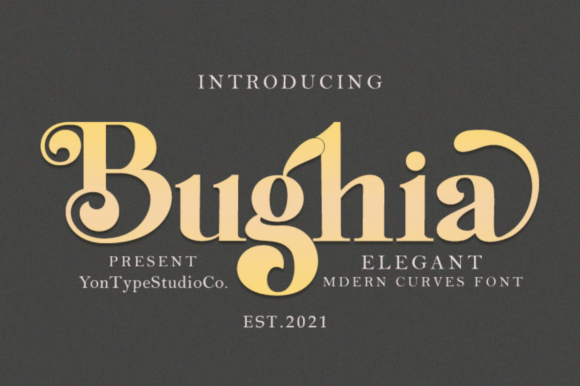
Bughia has a strong presence without feeling overwhelming. Its elegant curves and clean lines give it a versatile character that can adapt to various design contexts. Whether I used it for headers, call-to-action buttons, or promotional banners, it always felt intentional and well-balanced.
Visual Characteristics of Bughia
What makes Bughia special is its ability to blend sophistication with modernity. The serifs are subtly designed—neither too ornate nor too minimal. This gives the font a timeless quality while still fitting into contemporary digital aesthetics.
The weight of the font is just right. It’s not too thick that it becomes difficult to read, nor too thin that it loses impact. On mobile screens, where typography can be tricky, Bughia maintained clarity even at smaller sizes. That’s something I always look for when choosing a display font for responsive layouts.
Using Bughia in Real Projects
I tested Bughia on a product landing page for a creative portfolio site. Placing it over an image banner, I noticed how it added a touch of professionalism without overpowering the visuals. The contrast between the font and the background was just enough to ensure readability, which is crucial for user engagement.
In another case, I used Bughia for a coaching website header. The font helped establish a sense of trust and authority. It paired well with a sans-serif body font, creating a clear visual hierarchy. This kind of font pairing is essential for editorial-style websites where readability and style need to coexist.
Bughia also worked well for short phrases and button text. Its boldness made it stand out against light backgrounds, and it didn’t feel cluttered even when placed over dark overlays. This flexibility is a big plus for any designer looking to use a single font across multiple elements.
Readability and Brand Consistency
One thing I paid close attention to was how Bughia performed in different contexts. For instance, using it in a hero section required careful spacing and color choices to avoid eye strain. I found that keeping the font size consistent across sections helped maintain a polished brand experience.
When it comes to brand consistency, Bughia delivered. Its style aligned well with the overall tone of the project—professional but approachable. That’s a key factor when building a cohesive online brand identity.
For smaller screens, I made sure to test the font at lower resolutions. Bughia handled it well, maintaining legibility without sacrificing visual appeal. This is especially important for mobile users who scan content quickly.
Font Pairing and Stylistic Choices
Bughia works best when paired with a complementary font. I often used it with a clean sans-serif like Helvetica Neue for body copy. This combination gave the design a balanced feel—Bughia for headings and titles, and the sans-serif for easy reading.
If the project had a more editorial vibe, I might pair Bughia with another serif font for subtle variation. But for most web projects, a simple sans-serif body font keeps things streamlined and professional.
It’s also worth noting that Bughia includes multiple weights and styles. This allows for more nuanced design decisions, such as using lighter weights for subheadings and bolder weights for main headlines. The versatility of the font made it a great choice for a variety of layout scenarios.
Considerations Before Using Bughia
Before implementing Bughia on a live site, I checked the licensing options. It’s important to make sure the font is suitable for commercial use, especially if you’re working on client projects or selling products online.
I also confirmed that the font supports multilingual characters, which is a must for global brands. And since Bughia is available as a webfont, it loaded quickly without affecting the site’s performance. Fast loading times are critical for user retention and SEO rankings.
Finally, I made sure to test the font across different platforms and browsers. Bughia rendered consistently, which is a relief when you're aiming for a seamless user experience across devices.
Overall, Bughia proved to be a reliable and stylish choice for a range of web design applications. Its balance of elegance and functionality made it a valuable asset in creating a more polished online brand experience.